📋 Before you start
What this section is for, and what it isn't.
The NAIT section keeps NAIT-ready records for your cattle and deer — tag numbers, tagging deadlines, movements on and off your block, and deaths. It's your own record, on your phone, in the paddock where things actually happen.
⚠️ Important — this is the bit to be clear on
My Block Hand does not submit anything to OSPRI. You still have to register your animals and record movements in the NAIT system yourself, within the legal timeframes. What this does is make sure that when you sit down to do it, every number you need is in one place and nothing's been forgotten.
Why it's built this way: the 48-hour movement rule is a memory problem far more often than a paperwork problem. Almost nobody misses a NAIT movement on purpose — the truck came on a Friday, the weekend happened, and by Monday it had slipped. Capturing it at the gate is what fixes that.
1️⃣ Turning it on
The NAIT section appears on its own — but two things have to be true.
You won't see a NAIT section until it's relevant to you. If it isn't showing, it'll be one of these:
- You have at least one Cattle or Deer animal. NAIT only covers those two, so the section stays hidden until you've added one. Add it under Animals first.
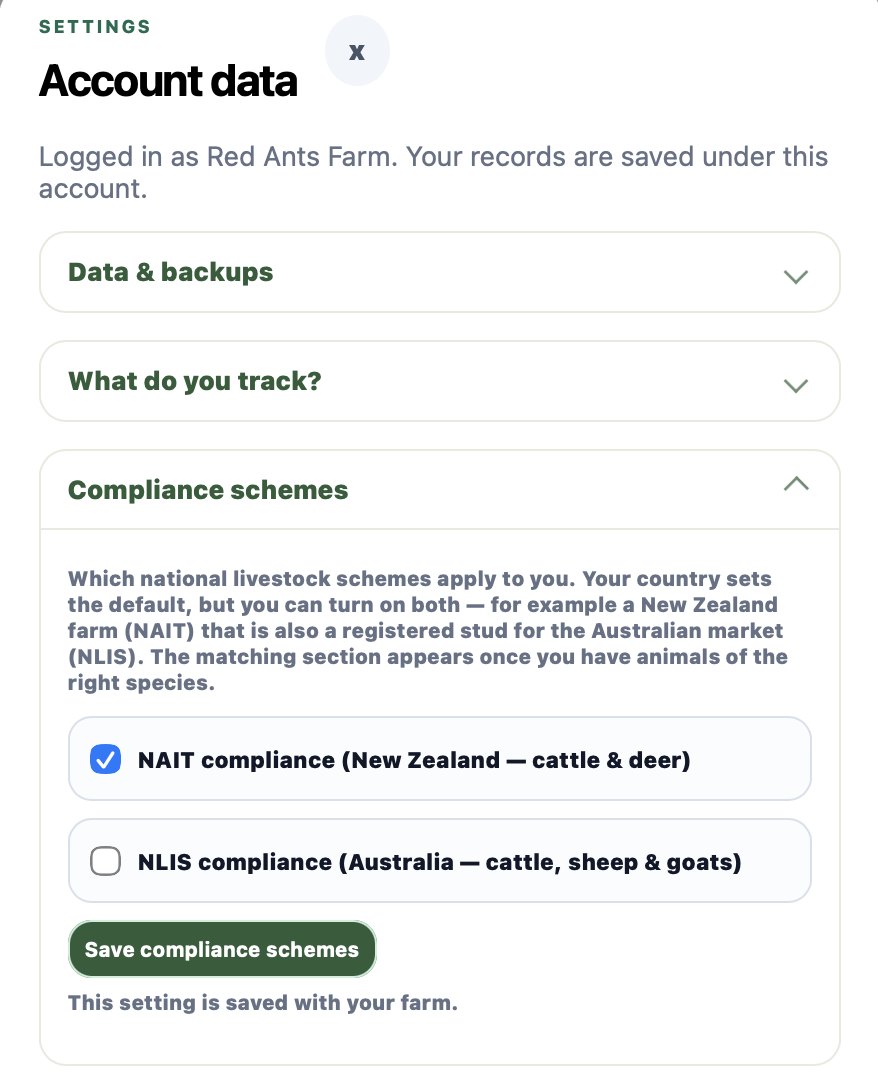
- NAIT is ticked under Settings → Compliance schemes. If your country is set to New Zealand it's on by default and you don't have to do anything.
🇦🇺 You can now run NAIT and NLIS together
Compliance schemes used to follow your country and nothing else. It's now an explicit choice, with your country only setting the default — so you can tick NAIT, NLIS (Australia), or both. Both matters if you're a New Zealand farm that's also a registered stud selling into Australia. Nothing changes for you unless you tick it. If NLIS is what you need, there's a separate NLIS guide.
2️⃣ Save your NAIT location number
Do this once and stop hunting for it.
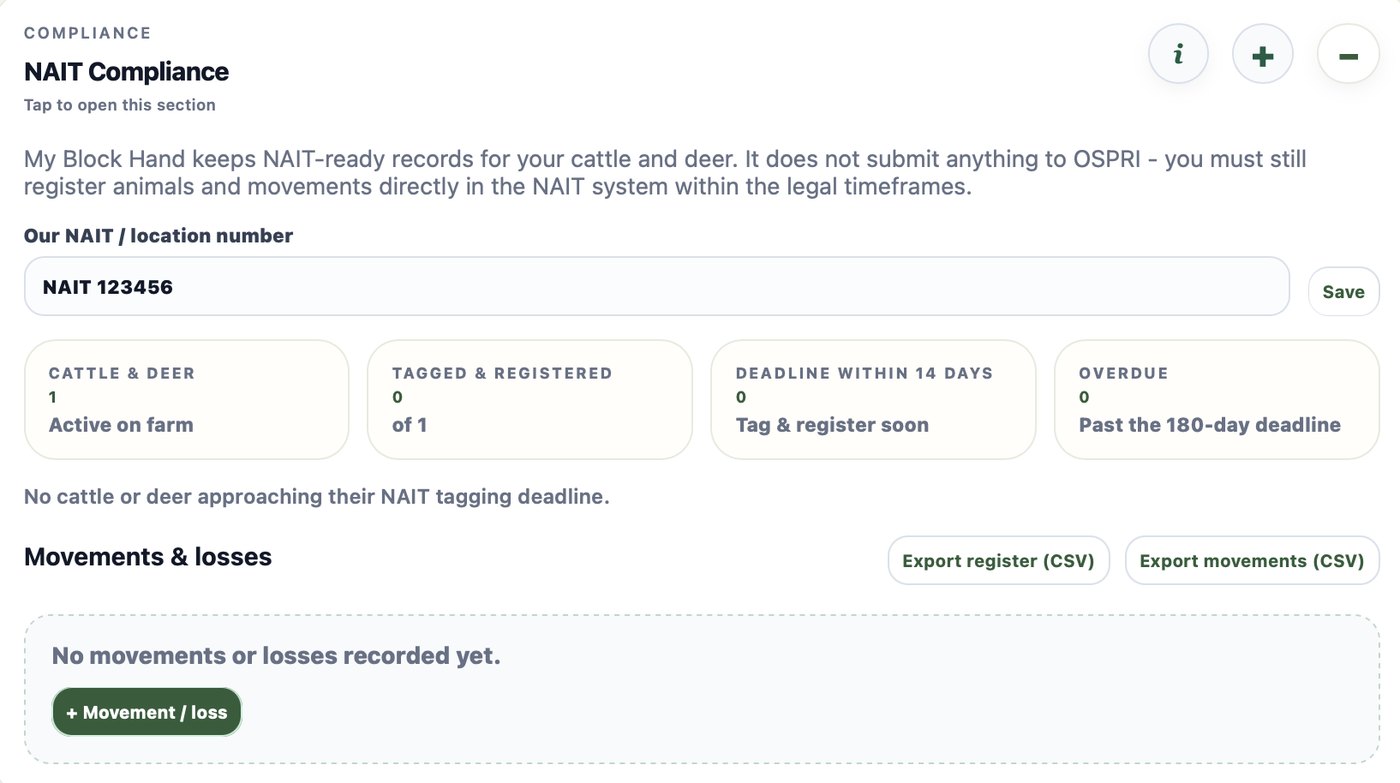
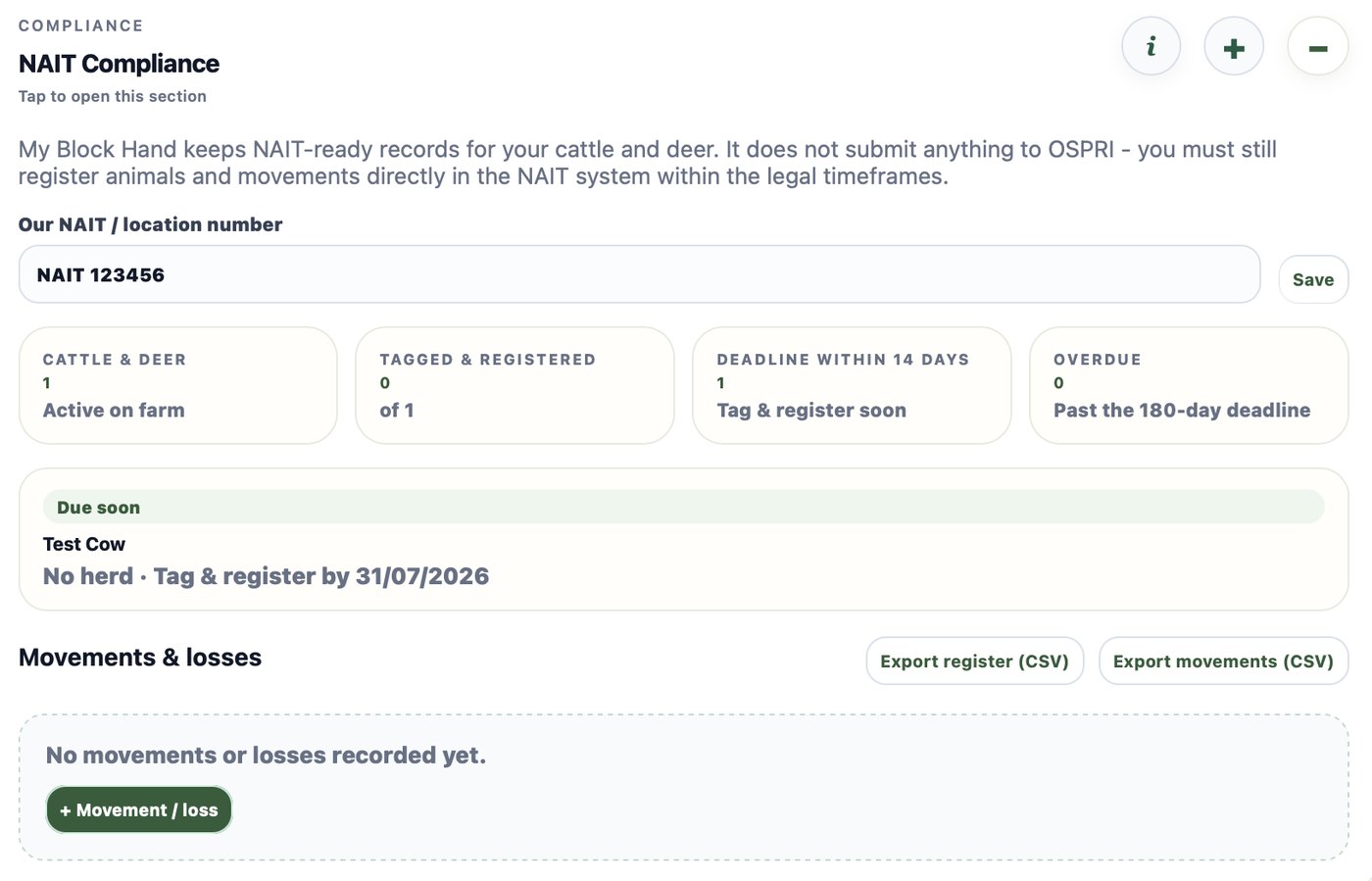
At the top of the NAIT section there's a field for Our NAIT / location number. Type it in and hit Save.
Your NAIT number belongs to the property, not to you — every movement on or off is recorded against it. Having it stored here means it's on your phone when you're standing at a saleyard or filling in a form, instead of on a letter in a drawer.
3️⃣ Add tag numbers to your animals
Each animal carries its own tag number and registration date.
Tag details live on the animal itself, not in a separate list — so they sit alongside that animal's health, breeding and movement history.
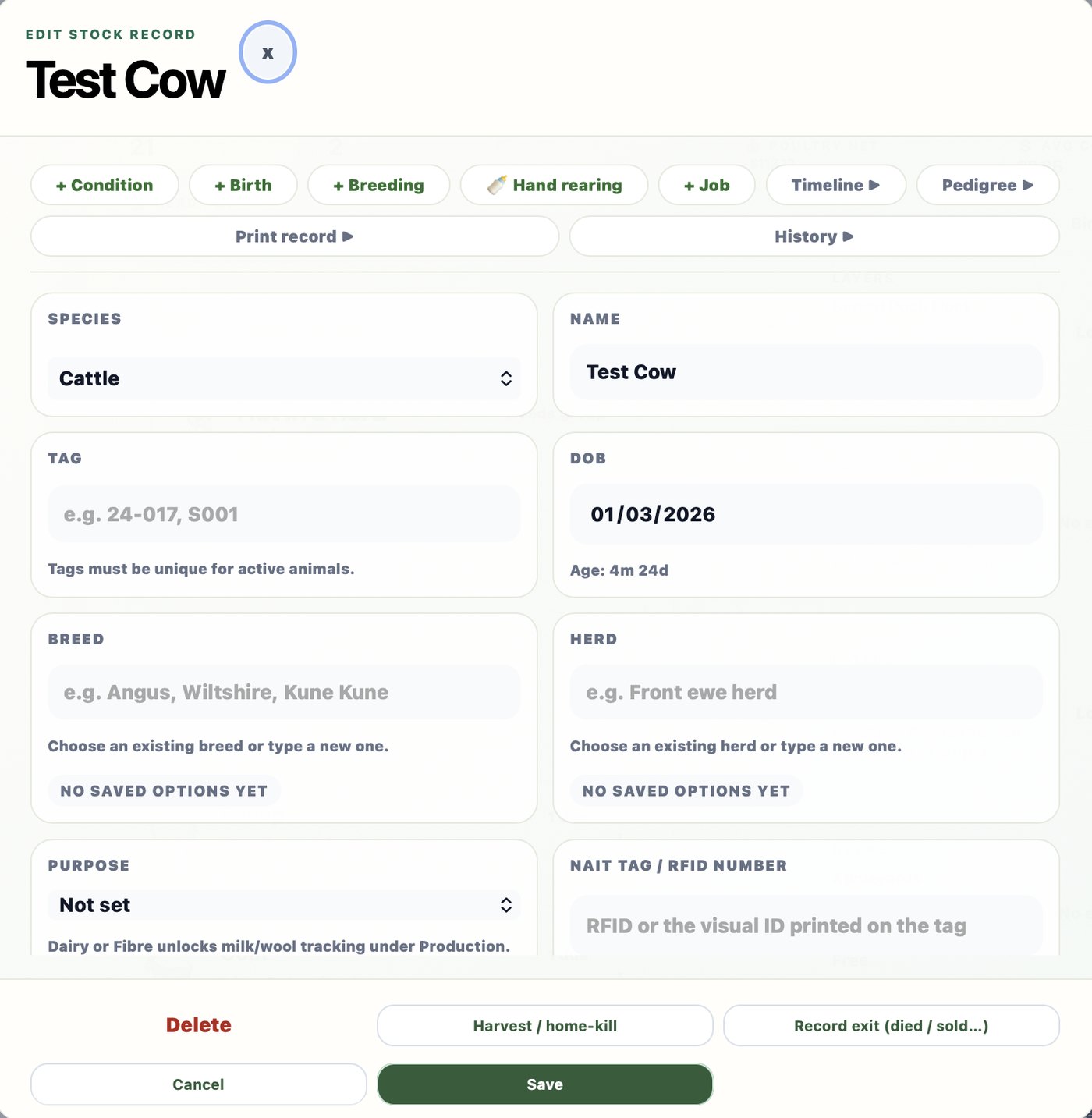
Open an animal under Animals, and on its record you'll find:
- NAIT tag / RFID number — the number on the tag in its ear.
- Date of birth — this one matters more than it looks. See below.
- NAIT registered on — the date you registered the animal in the NAIT system. Leave it blank until you've actually done it.
The app works out your tagging deadline from the date of birth. OSPRI require cattle and deer to be tagged and registered within 180 days of birth, or before the animal first moves off your property — whichever comes first. Put the DOB in and My Block Hand shows you the deadline date, so you're not counting on a calendar.
Once you set the NAIT registered on date, that animal drops off the attention list. Which brings us to…
4️⃣ The attention list
Who still needs tagging or registering.
Under the location field, the NAIT section shows a short dashboard and an attention list — animals that still need a tag number, still need registering, or are coming up on their 180-day deadline.
This is the bit worth glancing at every so often. It's designed to answer one question — is there anything I'm about to be late on? — without you having to open every animal to check.
5️⃣ Log a movement or loss
Every time stock arrive, leave, or die.
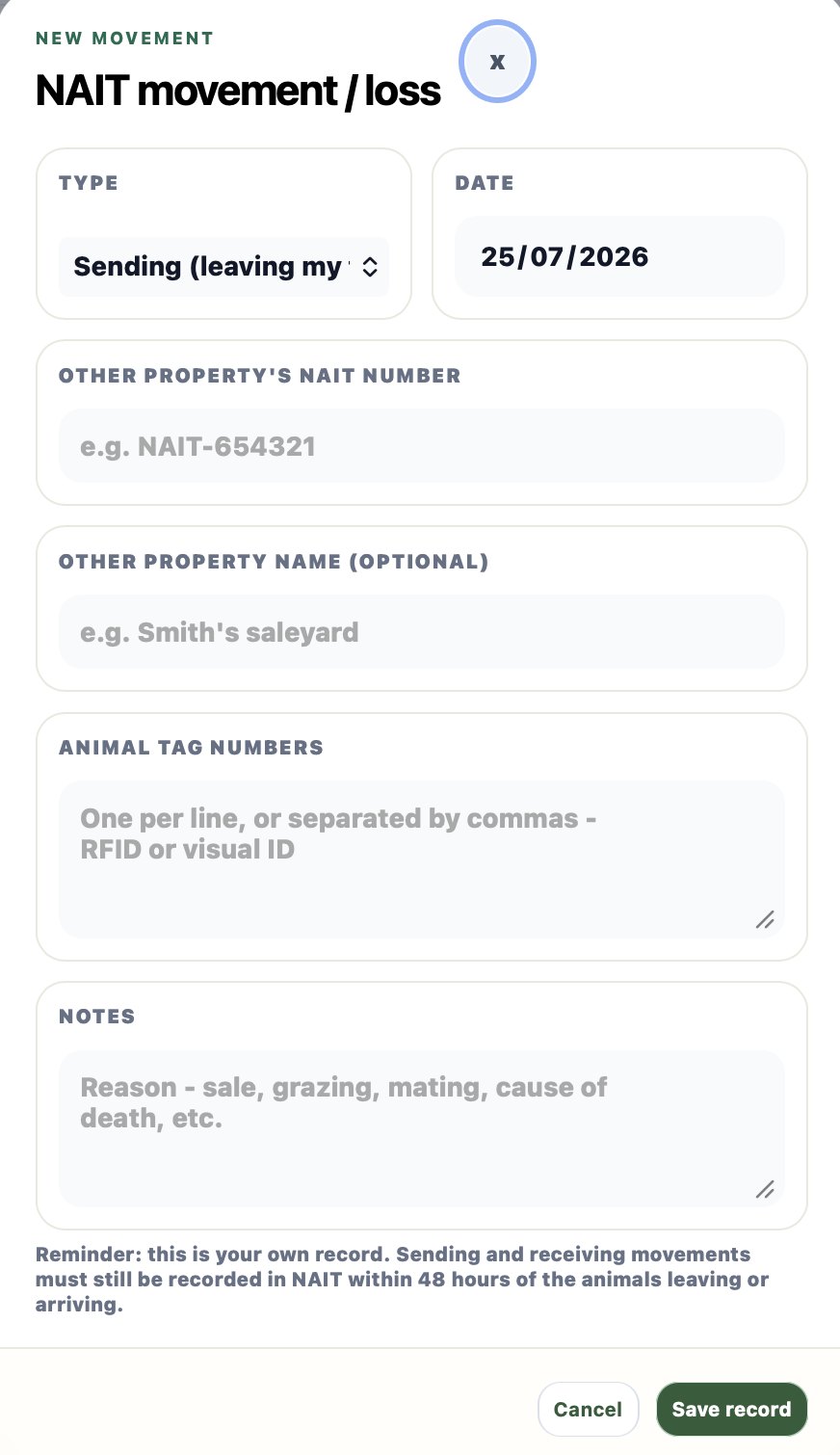
Use the + button in the NAIT section heading, then + Movement / loss. You'll get a short form:
- Type — Sending (leaving my farm), Receiving (arriving at my farm), or Death / Loss.
- Date — when it actually happened, not when you're logging it.
- Other property's NAIT number — where they went to or came from. Worth asking for at the time; it's much harder to chase later.
- Other property name — optional, but "Smith's saleyard" is easier to recognise in six months than a number.
- Animal tag numbers — one per line, or comma separated. RFID or visual ID.
- Notes — reason for the move, or cause of death.
🕐 The 48-hour rule
Both ends of a journey get recorded in NAIT — the sender records the animals leaving, the receiver records them arriving, each within 48 hours. Logging it here doesn't do that for you. Do this at the gate so you have the details, then file it in your NAIT account.
Movements people forget: stock going to the works or a sale, animals away for grazing and back, a bull borrowed from a neighbour, and — OSPRI specifically mention this — school pet days.
Deaths and home kills matter too. If you don't record them, the animal stays "live" in the system and your records stop matching your paddock.
6️⃣ Export your records
Two CSV files, any time you want them.
In the Movements & losses heading there are two buttons:
- Export register (CSV) — your full cattle and deer register: animals, tag numbers, registration dates.
- Export movements (CSV) — every movement and loss you've logged.
Both open in Excel, Numbers or Google Sheets. Handy for your accountant, for an audit, if OSPRI ever ask you to substantiate something, or just as your own backup.

✅ What the app does vs what you do
The honest split.
My Block Hand handles: storing your location number; tag numbers and registration dates against each animal; working out the 180-day deadline from date of birth; flagging animals that need attention; a dated log of movements and losses with the other property's number; and CSV exports of the lot.
You still have to: register as a PICA and register your location with OSPRI; register each animal in the NAIT system; record sending and receiving movements in NAIT within 48 hours; and make the annual declaration of your other animals.
🐷 The annual declaration most people miss
If you have cattle or deer in NAIT, once a year you also have to declare the other farm animals on your place that could spread diseases like foot and mouth — pigs, goats, llamas, alpacas and sheep. They don't need NAIT tags, but they do need declaring. Plenty of block owners with a couple of cows and a few sheep have no idea this applies to them.
The official rules — and where you actually register — live on OSPRI's lifestyle farmers page. If you're unsure about your own situation, check there or ring them.
This guide describes My Block Hand as at July 2026. The NAIT information is general and current at that date — it isn't legal advice, and requirements can change. Always check ospri.co.nz for your own situation.