📋 Before you start
What this section is really answering.
Paddocks exists to answer one question you ask constantly and usually guess at: which paddock should the stock go into next?
Everything else — the rest targets, the statuses, the movement log — is built to make that answer appear without you having to hold six paddocks and their last grazing dates in your head.
📖 The farming side of this
This page is about operating the app. If you want to understand the grazing principles behind these features — how long pasture should rest, how much residual to leave, and why rest days aren't the same as recovery — read Rotational grazing for small farms.
1️⃣ Adding paddocks
Set them up once, roughly, and refine later.
From the Paddocks card use + then + Paddock. The fields:
- Paddock name — what you actually call it. "Front flat", "Back of the shed".
- Size and size unit — acres, hectares or square metres. Optional, but needed later if you want kilograms of dry matter rather than percentages.
- Paddock group / use — optional grouping, called a zone elsewhere in the app. Worth setting if you run distinct areas, because you can set rest targets for a whole zone at once.
- Last grazed — optional, and leave it blank if you're just setting up. Fill it in if you know it, because the rest clock starts from here.
- Target rest period by season — four fields. See below.
- Growing — what's in it: rye/clover, chicory, plantain, native grass and others.
Don't try to be precise on the first pass. A paddock with just a name is already useful; sizes and rest targets can follow once you've seen how the section behaves.
2️⃣ Rest targets by season
Because a paddock in July isn't a paddock in October.
▶ Watch it done
How to set paddock rest targets, a short video on the real app with Red Ants Farm's own records.
This is the part people skip and shouldn't. Grass grows at wildly different rates through the year, so a single "rest 30 days" rule is wrong for most of it. My Block Hand keeps four targets per paddock and automatically uses whichever matches the current NZ season.
Leave a season blank and it uses the built-in default. Those defaults, with the typical range shown beside each field in the app:
- Spring — 25 days (21–28 typical)
- Summer — 32 days (21–42 typical)
- Autumn — 48 days (35–60 typical)
- Winter — 75 days (60–90 typical)
They're starting points, not rules — edit them freely, and expect your own numbers to drift away from these as you learn your block. Why they should drift, and how to tell when to change one.
⚡ Setting a whole zone at once
Rather than editing twenty paddocks one at a time, use Set rest targets for zone on the Paddocks card. It applies your four seasonal targets to every paddock in that zone — and note it overwrites any per-paddock overrides already set within it. Leaving a season blank there resets those paddocks back to the app default for that season.
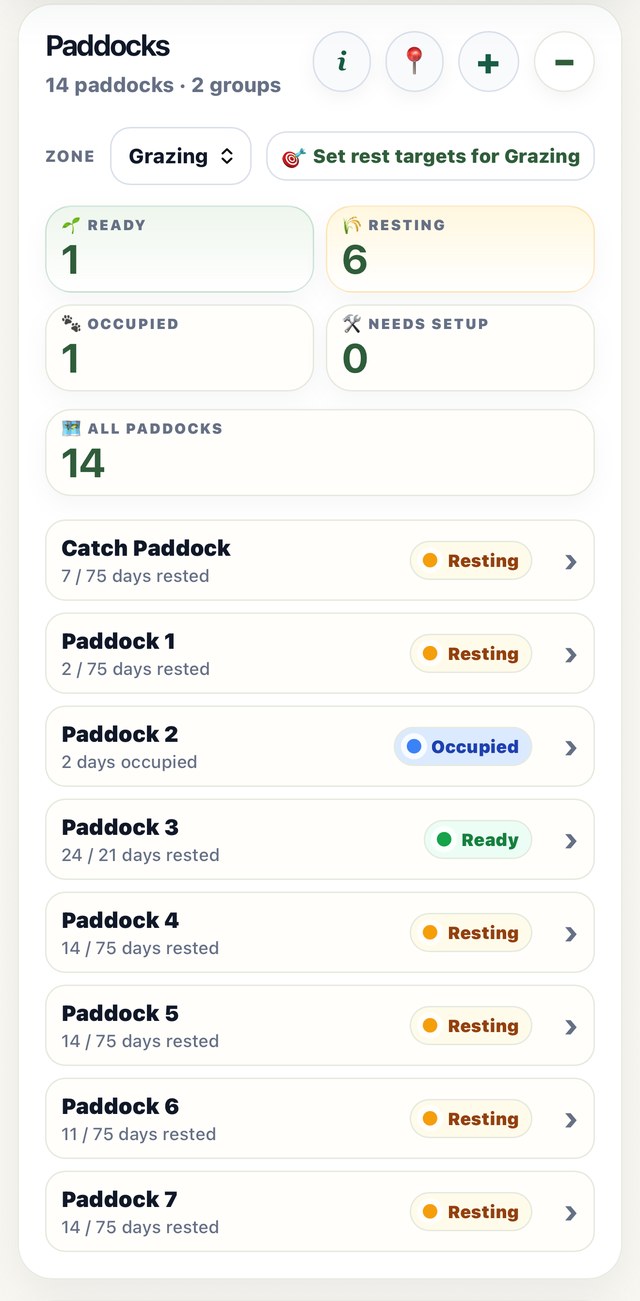
3️⃣ Reading the statuses
Four states, and what each is telling you.
Every paddock shows a status. The dashboard at the top of the section counts them, and each count is tappable to see which paddocks are in that state.
- 🟢 Ready — rested past its target for the current season. This is your shortlist.
- 🟡 Resting — coming back. Shows N days to target, or a % recovered figure if you're measuring cover.
- 🔵 Occupied — stock are in it now.
- ⚪ Needs setup — no last-grazed date, so the app can't work anything out yet. Add one and it starts tracking.
A paddock inside an active withholding period is called out separately with Do not graze until and the date, which is the one status you don't want to discover by memory.
⚠️ "Ready" means worth checking, not "graze it"
Ready means the paddock has passed the rest target you set. It does not mean the app has looked at the grass. It hasn't — nothing on your phone can. Walk it before you open the gate.
4️⃣ Moving stock
The one action that makes everything else work.
▶ Watch it done
How to move a herd (and strip graze), a short video on the real app with Red Ants Farm's own records.
Use + Movement on the Paddocks card, Move Herd Here from a paddock, or Move Herd from a herd. Tick the herds, set the date and optional time, choose where they're going — you can tick several paddocks if the mob grazes them together with the gates open — and add a note.
Movements are the input the whole section runs on. A paddock's rest clock starts when stock come off it, so if movements aren't logged, the statuses are fiction. It's the one habit worth being strict about.
⚠️ Withholding is checked on the way in
If the paddock you're moving into has an active withholding period — from a spray or a treatment logged against it — the app stops and tells you before saving. You can cancel or continue, because you might have a good reason. It's the check that saves you three weeks after you sprayed and forgot.
Made a mistake? A movement can be undone from the paddock's grazing history, most recent first — undoing restores the previous last-grazed date. Full detail on herds and moving individual animals is in the Animals help page.
5️⃣ Paddock detail
Everything about one paddock in one place.
Tapping a paddock opens its detail: current status, what's in it, its grazing history, and its pasture notes. Three actions sit at the top — Move Herd Here, Add Paddock Job and Edit Paddock.
There's also All paddocks, a flat table of the lot: name, size, unit, last grazed, rest, what's growing and which herds are in them. Useful when you want to compare rather than drill in.
6️⃣ Strip grazing
Breaking a paddock up with a hot wire.
If you're shifting a break each day rather than moving stock between paddocks, the paddock detail has a Strip grazing control. Advance the break as you move the wire and the app counts the breaks, showing the paddock as strip-grazed while stock are in it.
Because the mob is in one paddock for a long stretch, the rest figure for a strip-grazed paddock is shown as a range rather than a single number — the first break has been recovering far longer than the last one, and a single figure would be misleading either way.
7️⃣ Pasture cover
Recording what's there, instead of counting days.
Rest days are a proxy. They tell you how long it's been, not what's actually grown — and in a dry summer those are very different things. Pasture cover is the optional next step, and it's entirely opt-in: ignore it and your paddocks behave exactly as they do now.
Open it from the 🌿 button in a paddock's Pasture notes card. Set the targets first:
- Stock class — seeds a researched starting range, with its source named on screen (DairyNZ for cattle, Beef + Lamb NZ for sheep residuals). Editable, and there's a "Not set — I'll enter my own" option.
- Measure in — kg DM/ha, or centimetres if you're using a sward stick.
- Move stock off at — your residual. The point you stop grazing.
- Ready to graze at — the cover you want before stock go back in.
Then log readings, each tagged as one of three kinds — entry before stock go in, check while grazing or resting, or residual as they come off. That single choice is what tells the app which half of the cycle the paddock is in.
- Grazing — how much has been eaten, kg DM remaining above your move-off point, and roughly how long until they hit it.
- Recovering — a % recovered bar and an estimate worded strictly as at the rate since your last check.
🤔 Why the estimates are worded so carefully
You'll notice the app never promises a date. If growth has stalled it says "No growth since your last check" rather than inventing a number, and it suppresses totals entirely when the paddock has no area set. Drought is information, not a failure to calculate — and a confident wrong date is worse than an honest blank.
How to take the measurement, what a residual target should be for your stock, and the free no-gear alternative (the three-leaf check) are covered in Rotational grazing for small farms.
8️⃣ Withholding periods
Sprays and treatments that stop a paddock being grazed.
If you log a product against a paddock and that product carries a grazing withholding period, the app holds the date. The paddock is flagged Do not graze until, and moving stock in triggers the warning described above.
The record is entered on the product side, not here — see the Products & Chemicals help page for entering a product, its withholding period and the paddock it was applied to.
🔧 Troubleshooting
When a paddock isn't doing what you expect.
A paddock says "Needs setup" and won't move off it. It has no last-grazed date. Either edit the paddock and set one, or log a movement — both start the clock.
Everything went "Ready" at once. Usually a zone bulk-set: Set rest targets for zone overwrites the per-paddock targets inside that zone, and a blank season there resets those paddocks to the app default. Re-enter the ones you'd customised.
The rest target changed on its own. It didn't — the season did. The app switches between your four seasonal targets automatically, so the number a paddock is measured against changes at each season boundary.
A paddock still shows stock that have gone. The movement off wasn't logged. Log the move to where they actually are; the rest clock starts from that date, not from today.
Rest days look wrong after fixing a mistake. Undo works most-recent-first. If you backdate a corrective movement, the grazing history and the rest clock update, but the grazing-days counter reads in the order things were entered — so re-entering in date order gives the cleanest result.
Pasture cover shows a % but no kilograms. The paddock has no size set. Add the size and unit in Edit Paddock and the kg DM figures appear.
A paddock's area looks wrong. Check the size unit on the paddock — acres and hectares are a 2.47× difference and every kg DM figure follows from it.
The rest figure for a strip-grazed paddock is a range. That's deliberate — see strip grazing above.
Still stuck? Email us from the support page, or hit reply on any Bulletin email. Tell us the paddock name and what you expected to see.
✅ What the app does vs what you do
The honest split.
My Block Hand handles: rest days tracked from your movements; the right seasonal target applied automatically; ready / resting / occupied / needs-setup statuses with counts; withholding warnings before a move; strip-grazing break counts and a sensible rest range; and, if you measure, % recovered, kg DM eaten and remaining, and time to your move-off point.
You still have to: log the movements — nothing works without them; decide your own rest targets once the defaults stop fitting; do the measuring if you want the cover side; and make the actual call on where stock go, because the app shows you the shortlist, not the answer.
This page describes My Block Hand as at August 2026. Rest targets and pasture figures are editable starting points from published general guidance, not prescriptions for your block — your own records, and your own eyes on the paddock, should override them.